
Start a new chat in the mobile app
Usually customers write first. When you need to write first, for example to confirm an order or call back a customer, start the chat yourself in the Omnichannel Contact Center by SMSBAT app.
For everything else in the app, see the Mobile app guide. To start chats in other channels, use the web workspace, see How to create chats.
Open Create Chat
On the chat list, tap the pen icon in the top right corner. The Create Chat window opens.
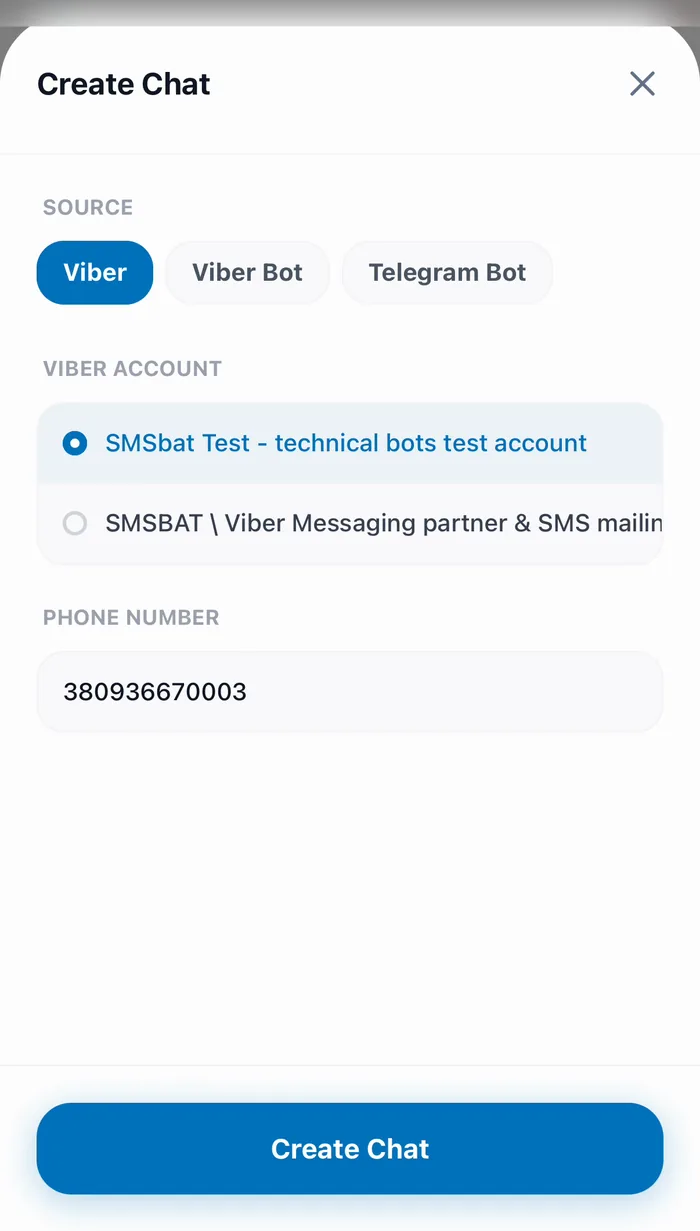
Choose the source
Under Source, tap where the conversation will happen:
| Source | What to fill in next |
|---|---|
| Viber | Viber Account: your connected Viber sender. Phone Number: the customer’s number with the country code, for example 380XXXXXXXXX. |
| Viber Bot | Bot: pick the bot, then the User of that bot. Use the search field to find the user by name. |
| Telegram Bot | Bot and User, the same as for a Viber bot. |
A bot can write only to people who have already started a conversation with it, so the User list shows only them.
Create the chat
Tap Create Chat. The chat opens and you can write to the customer, see Reply to the customer.
If a chat with this number already exists, the app opens the existing chat instead of creating a second one.
The new chat appears at the top of the chat list.
Messages you may see
| Message | What to do |
|---|---|
| Select a source | Tap Viber, Viber Bot or Telegram Bot first. |
| Select a Viber account | Tap one of your Viber accounts. |
| Enter phone number | Type the customer’s number. |
| Select a bot user | Pick the user in the list under the bot. |
| This organization has no connected Viber accounts | No Viber sender is connected to your organization. Ask your administrator, see Viber accounts. |
| This organization has no connected bots | No bot is connected. Ask your administrator, see Viber bots and Telegram bots. |
| No users found | Nobody has written to this bot yet, or the search finds no match. |
| Failed to create chat | Check the number and the connection and try again. |
Common questions
Why can I not start a WhatsApp, Instagram or Facebook chat? The app starts chats only in Viber, Viber bots and Telegram bots. Use chat.smsbat.com for the other channels.
In which format do I enter the number? With the country code and without the plus sign or spaces, for example 380XXXXXXXXX.
Will the customer receive anything when I create the chat? No. The customer receives only the message you send in the chat.
Which Viber account should I choose? The one your company uses to write to customers. The customer sees its name and logo in Viber.