
FCM V1 and APNs

Mobile push notifications for your app

The free channel first, paid channels only if it fails

Deliver notifications straight into your iOS and Android app and let SMSBAT fall back to a Telegram bot, a Viber bot, Viber Business Messages or SMS when the push is not confirmed in time. The paid channel is used only when the push did not reach the user.

iOS + Android

Native notifications in your own app

FCM V1 · APNs

Direct integration with Google and Apple

5 channels

Push, Telegram, Viber bots, Viber BM and SMS in one cascade

24/7

Technical support during integration

Who benefits most

Push pays off wherever a large share of the audience already has your app installed and the notification volume is high enough to matter.

E-commerce and marketplaces

Order, payment and delivery updates reach the app first and move to Viber or SMS only for customers who did not see them.

Fintech and banking

Transaction alerts and confirmations stay inside your own app rather than travelling through an external channel.

Delivery and logistics

Courier assigned, courier arriving, status changed — the events that have to reach the user within seconds.

Products with high message volume

Move the bulk of notifications to push and pay for Viber or SMS only where the push did not get through.

Services with codes and confirmations

Send the code into the app first and fall back to SMS or Viber only when the push is not confirmed.

Any product with its own app

If the user already installed the app, the notification looks native and costs nothing extra.

What the push channel gives you

Push in SMSBAT is not a separate tool — it is the first and cheapest step of the same cascade your Viber and SMS already run through.

Cascade fallback out of the box

One request carries the push and its fallbacks. If no delivery confirmation arrives within the TTL you set, the next channel is sent automatically — a Telegram bot, a Viber bot, Viber Business Messages or SMS.

The cascade stops on delivery

As soon as your app reports the delivered or seen status, the remaining paid steps are cancelled. Without that callback the backend assumes the push failed and pays for a channel the user had already seen.

Data-only by design

The service sends a data payload and your app draws the notification itself, so the look, the grouping and the tap behaviour stay entirely under your control.

Notification inbox

An API that returns the notifications sent to an installation, so a user can open a message they swiped away.

Your own Firebase and APNs keys

Notifications are delivered under your own app and your own developer accounts — the user never sees an intermediary.

An integration kit instead of an SDK

There is no SDK to lock you in. You get the API contract, a Postman collection and a troubleshooting playbook covering the failures that actually happen — FID sent instead of a token, UNREGISTERED, Android delivering while iOS stays silent.

How to connect

Four steps from an empty account to the first notification on a device.

1

Set up Firebase

One Firebase project for both platforms, with an APNs auth key uploaded for iOS. The backend sends under the same project.

2

Register the installation

On sign-in the app sends the Firebase installation id together with the FCM registration token. Both travel together: one is the key, the other is what we deliver to.

3

Send through the API

One request with the push and its cascade fallbacks — Telegram, Viber or SMS.

4

Report the status back

The app confirms delivered on receipt and seen on tap, which stops the cascade and saves the paid channels.

What the notification looks like on a device

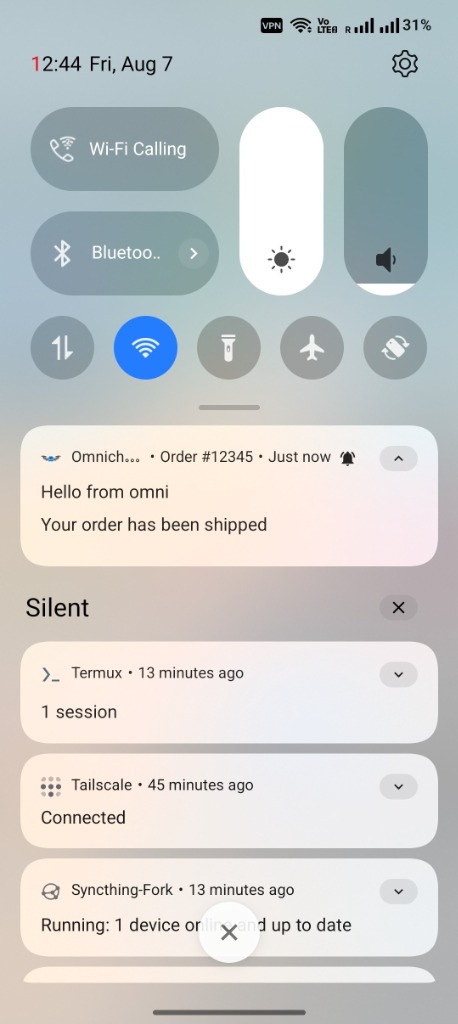
A real SMSBAT push in the Android notification shade: your app icon, the title, the order line and the status text. The payload arrives as data and the app renders it, so nothing in the notification points to an intermediary.

  • The notification arrives under your own app name and icon
  • The app decides how it looks — the service only delivers the payload
  • A tap opens the exact screen of the app and reports the seen status
  • The message stays available through the notification inbox API
SMSBAT push notification in the Android notification shade
Push notification FAQ

Connect push notifications

Tell us about your app and the volume of notifications — we will send the API contract and the Postman collection, and help you assemble the cascade for your scenario.