
Rakuten Viber has released a set of updates to Viber Business Messages ahead of the busiest season of the year: back to school, Black Friday and the holiday sales. The focus has moved from security and templates, the theme of the first half of the year, to richer and more engaging messages. Below is what changed and how to use it in your campaigns.
Video: Rakuten Viber for Business.
Templates: find the one you need faster
Since 15 July 2026 every transactional message must be sent from an approved Transactional Message Template. With dozens of templates per brand, finding the right one matters, so approved templates can now be searched by name in the Business Messages partner portal.
For you this means faster approval and editing of templates. If you have not moved your transactional traffic to templates yet, see How to create Viber templates.
GIFs in Business Messages
Every message format that can carry an image can now carry a GIF as well. The only exception is the Viber carousel. Animation is a simple way to make a seasonal promotion, a product launch or a loyalty milestone stand out in the chat list.
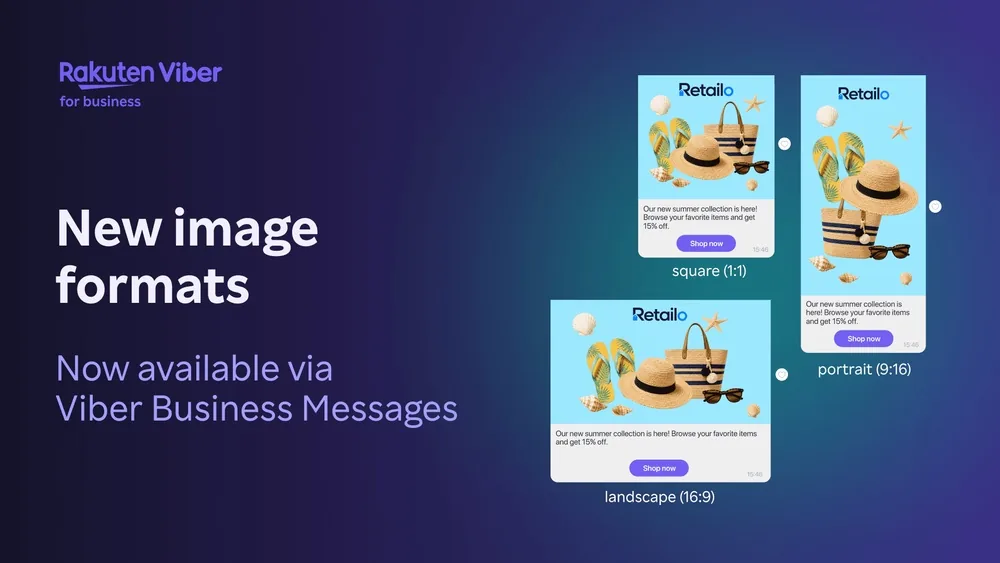
Portrait and landscape images
Until now an image in a Business Message had to be square. Two more formats are added:
- portrait 9:16, the natural shape for a phone screen and for creatives made for stories;
- landscape 16:9, for banners and wide visuals.
The new formats work in every Business Message type that supports images, so the creatives you already have for social networks and display ads can go to Viber without a redesign. Rakuten Viber announced the rollout for August 2026.
Quick Replies up to 1,000 characters
Quick Reply messages (previously called List messages) let a customer answer with one tap by choosing one of up to 10 prepared options. The length of an option has grown from 80 to 1,000 characters. You can now explain each choice properly, for example describe a delivery option with its price and date, and lead the customer through a longer scenario without free-text answers.
Different links for the image and the button
An image and a button in the same message can now lead to different pages. A practical split:
- image → a product or information page, for customers who want to learn more;
- button → checkout, registration or another key action, for customers who are ready.
Shorter paths for ready buyers usually mean more conversions, and separate links show in your analytics which part of the message works.
Translation inside Viber
Viber is used in 190 countries and in 44 languages. Users can now translate a Business Message into their own language directly in the app. For brands that write to international or multilingual audiences this makes every message easier to understand without sending separate versions.
Already available: Tap & Copy and OTP auto-copy
Two recent features are worth using in the autumn campaigns:
- Tap & Copy: the customer copies a promo code, voucher, tracking number or any other part of the message with one tap;
- OTP auto-copy: a one-time code sent through Viber is copied automatically on Android, and iOS 26 and later does it natively. It shortens sign-in and payment confirmation. More about codes in Viber: Two-factor authentication.
How to start
If you send Viber Business Messages through SMSBAT, write to your manager or to help@smsbat.com: we will tell you which of the new options are already available for your sender and how to use them through the dashboard or the API. If you do not have a Viber business sender yet, start with Viber Business Messages.
Source: Viber Business Messages Updates: August 2026, Rakuten Viber for Business.