
Rakuten Viber has released a set of updates to Viber Business Messages ahead of the busiest season of the year: back to school, Black Friday and the holiday sales. The focus has moved from security and templates, the theme of the first half of the year, to richer and more engaging messages. Below is what changed and how to use it in your campaigns.
Video: Rakuten Viber for Business.
Templates: find the one you need faster
Since 15 July 2026 every transactional message must be sent from an approved Transactional Message Template. With dozens of templates per brand, finding the right one matters, so approved templates can now be searched by name in the Business Messages partner portal.
For you this means faster approval and editing of templates. If you have not moved your transactional traffic to templates yet, see How to create Viber templates.
GIFs in Business Messages
Every message format that can carry an image can now carry a GIF as well. The only exception is the Viber carousel. Animation is a simple way to make a seasonal promotion, a product launch or a loyalty milestone stand out in the chat list.
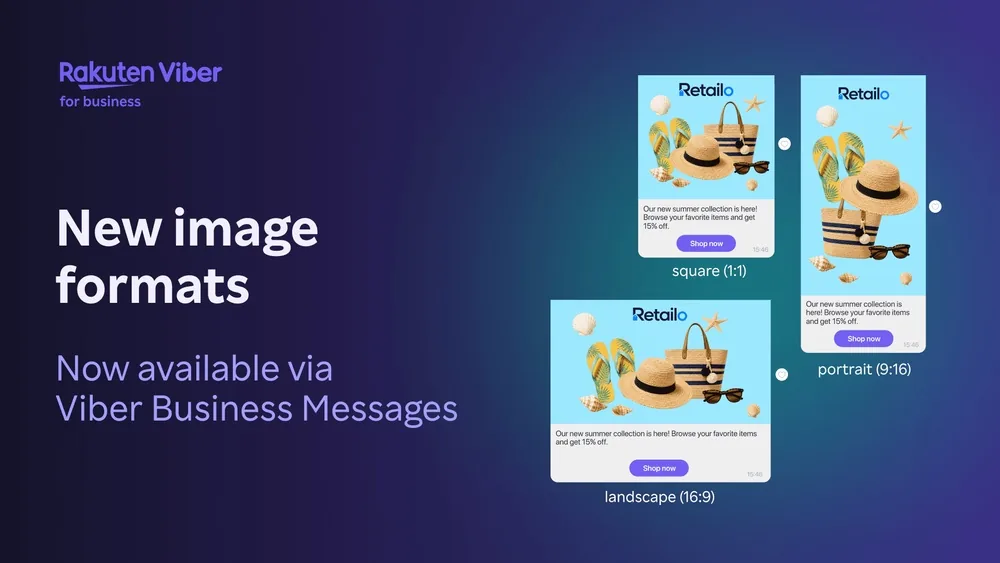
Portrait and landscape images
Until now an image in a Business Message had to be square. Two more formats are added:
- portrait 9:16, the natural shape for a phone screen and for creatives made for stories;
- 16:9 လှပသော ပုံစံ၊ ဘန်နာများနှင့် ကျယ်ပြန့်သော ပုံရိပ်များအတွက်။
အသစ်ထွက်ရှိသော ပုံစံများသည် ပုံများကို ထောက်ပံ့သည့် Business Message အမျိုးအစားအားလုံးတွင် အလုပ်လုပ်နိုင်သဖြင့် လူမှုကွန်ရက်များနှင့် display ads များအတွက် သင်ယခုအချိန်ထိ အသုံးပြုထားသော creatives များကို Viber တွင် ပြန်လည်ဒီဇိုင်းမပြုလုပ်ဘဲ အသုံးပြုနိုင်ပါသည်။ Rakuten Viber သည် ၂၀၂၆ ခုနှစ် ဩဂုတ်လတွင် ဖြန့်ချိမည်ဟု ကြေညာထားပါသည်။
Quick Replies များအတွက် ၁,၀၀၀ ဂဏန်းအထိ
Quick Reply မက်ဆေ့ချ်များ (အရင်က List messages ဟုခေါ်ခဲ့သည်) သည် ဖောက်သည်များကို ပြင်ဆင်ထားသော ရွေးချယ်စရာ ၁၀ ခုထက်မပိုသော ရွေးချယ်စရာများထဲမှ တစ်ခုကို ရွေးချယ်ခြင်းဖြင့် တစ်ကြိမ်နှိပ်ရုံဖြင့် အဖြေပေးနိုင်စေသည်။ ရွေးချယ်စရာတစ်ခု၏ အလျားသည် ၈၀ ဂဏန်းမှ ၁,၀၀၀ ဂဏန်းအထိ တိုးလာပါသည်။ ယခုအခါ ရွေးချယ်စရာတစ်ခုစီကို သင့်တော်စွာ ရှင်းပြနိုင်ပြီး၊ ဥပမာအားဖြင့် ဈေးနှုန်းနှင့် ရက်စွဲပါ ပို့ဆောင်ရေးရွေးချယ်စရာကို ဖော်ပြခြင်း၊ လွတ်လပ်စွာ ရေးသားရသော အဖြေများမပါဘဲ ပိုရှည်လျားသော အဆင့်ဆင့် လုပ်ဆောင်ချက်များကို ဦးဆောင်ပေးနိုင်ပါသည်။
ပုံနှင့် ခလုတ်အတွက် ကွဲပြားသော လင့်ခ်များ
မက်ဆေ့ချ်တစ်ခုတည်းရှိ ပုံနှင့် ခလုတ်သည် ယခုအခါ ကွဲပြားသော စာမျက်နှာများသို့ ဦးတည်နိုင်ပါသည်။ လက်တွေ့ကျသော ခွဲခြားမှုမှာ -
- ပုံ → ထပ်မံသိရှိလိုသူ ဖောက်သည်များအတွက် ထုတ်ကုန် သို့မဟုတ် အချက်အလက် စာမျက်နှာသို့;
- ခလုတ် → ဝယ်ယူပြီးသား ဖောက်သည်များအတွက် checkout၊ မှတ်ပုံတင်ခြင်း သို့မဟုတ် အခြားအဓိက လုပ်ဆောင်ချက်သို့။
ဝယ်ယူရန် အဆင်သင့်ဖြစ်သော ဝယ်သူများအတွက် ပိုတိုတောင်းသော လမ်းကြောင်းများသည် ပိုမိုများပြားသော conversion များကို ဖြစ်စေလေ့ရှိပြီး၊ ကွဲပြားသော လင့်ခ်များသည် မက်ဆေ့ချ်၏ မည်သည့်အပိုင်းက အလုပ်လုပ်သည်ကို သင့် analytics တွင် ပြသပေးပါသည်။
Viber အတွင်း ဘာသာပြန်ခြင်း
Viber ကို နိုင်ငံ ၁၉၀ ခုနှင့် ဘာသာစကား ၄၄ မျိုးတွင် အသုံးပြုကြပါသည်။ အသုံးပြုသူများသည် ယခုအခါ app အတွင်းမှတစ်ဆင့် Business Message ကို မိမိဘာသာစကားသို့ တိုက်ရိုက်ဘာသာပြန်နိုင်ပါသည်။ နိုင်ငံတကာ သို့မဟုတ် ဘာသာစကားပေါင်းစုံ ပရိသတ်များကို ရေးသားသော ဘရန်ဒ်များအတွက် ဤအရာသည် သီးသန့်ဗားရှင်းများ မပို့ပေမီ မက်ဆေ့ချ်တိုင်းကို ပိုမိုလွယ်ကူစွာ နားလည်နိုင်စေပါသည်။
ယခုအချိန်ထိ ရရှိနိုင်ပြီး: Tap & Copy နှင့် OTP auto-copy
အောက်တိုဘာလ ကမ္ပိန်းများတွင် အသုံးပြုသင့်သော နောက်ဆုံးရ လုပ်ဆောင်ချက်နှစ်ခုမှာ -
- နှိပ်ပြီး ကူးယူခြင်း (Tap & Copy): ဖောက်သည်သည် ပရိုမိုကုဒ်၊ ဗိုချာ၊ ခြေရာခံကုဒ် သို့မဟုတ် စာသား၏ အခြားအပိုင်းအစများကို တစ်ကြိမ်နှိပ်ခြင်းဖြင့် ကူးယူနိုင်သည်;
- OTP အလိုမတင် ကူးယူခြင်း: Viber မှတစ်ဆင့် ပို့သော တစ်ကြိမ်သုံးကုဒ်ကို Android တွင် အလိုအလျောက် ကူးယူပေးပြီး iOS 26 နှင့် နောက်ပိုင်းဗားရှင်းများတွင်လည်း မူလအခြေအနေအတိုင်း အလိုအလျောက် ကူးယူပေးနိုင်သည်။ ၎င်းသည် အကောင့်ဖွင့်ခြင်းနှင့် ငွေပေးချေမှု အတည်ပြုခြင်းကို အချိန်ကုန်ကျမှု လျှော့ချပေးသည်။ Viber တွင် ကုဒ်များနှင့် ပတ်သက်၍ အသေးစိတ်: Two-factor authentication.
မည်သို့ စတင်ရမည်နည်း
SMSBAT မှတစ်ဆင့် Viber Business Messages များ ပို့ပါက သင့်မန်နေဂျာထံ သို့မဟုတ် help@smsbat.com သို့ ဆက်သွယ်ပါ။ သင့်ပို့သူအတွက် နောက်ဆုံးရ ရွေးချယ်စရာများအနက် မည်သည်များ အသုံးပြုနိုင်ပြီး dashboard သို့မဟုတ် API မှတစ်ဆင့် မည်သို့အသုံးပြုရမည်ကို ပြောပြပေးပါမည်။ Viber business sender မရှိသေးပါက Viber Business Messages မှ စတင်ပါ။
အရင်းအမြစ်: Viber Business Messages Updates: August 2026, Rakuten Viber for Business.